Collaborative projection mapping for TouchDesigner.
Moonshine: projection mapping made easy
Native or browser
Use the app on Windows or Mac, or join the same show from a trusted browser on the LAN.
The whole team, one show
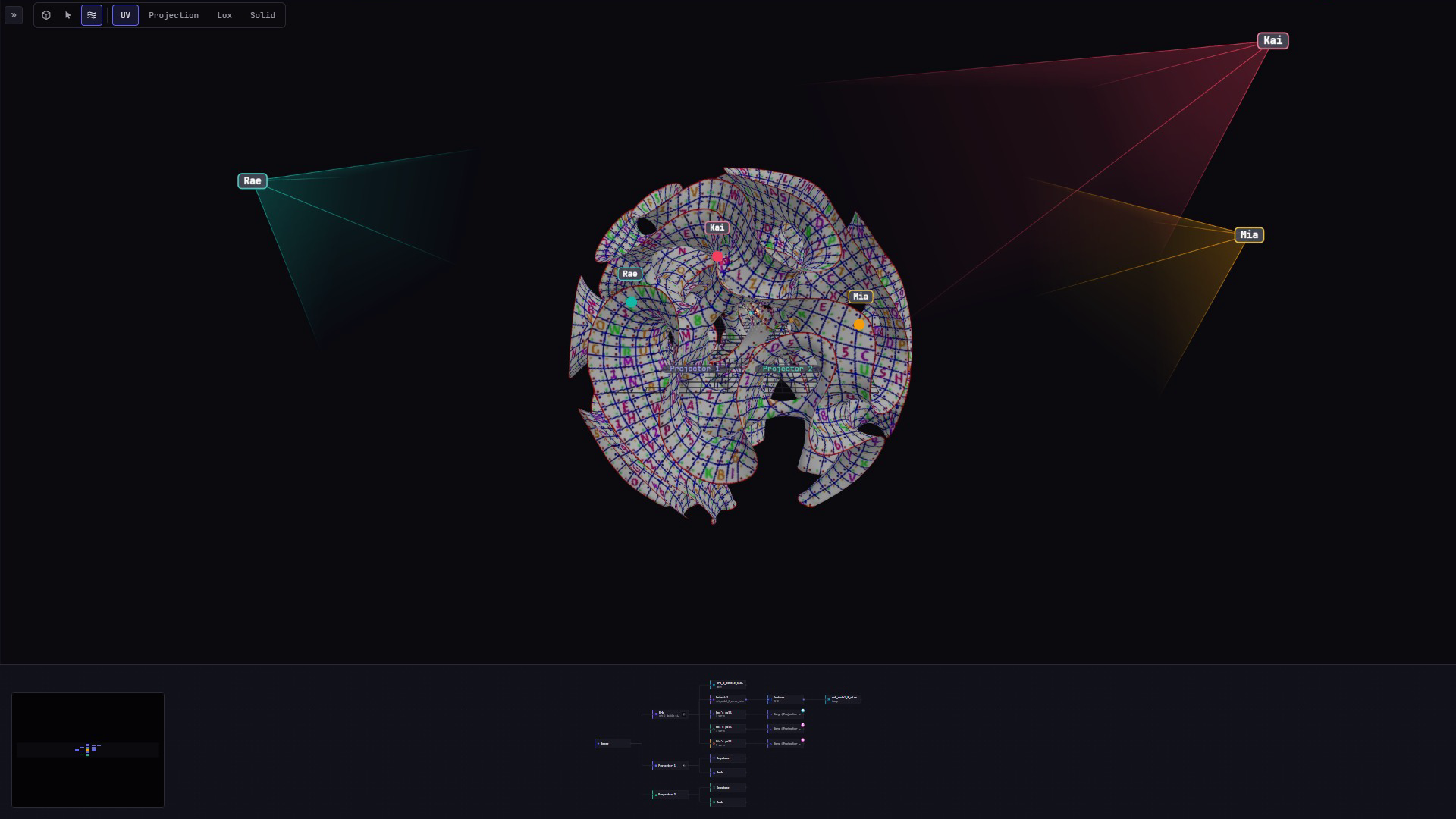
Everyone works in the same live project at once: see each other’s cursors, sculpt one surface together, and never pass files around.
Built on TouchDesigner
The renderer your studio already trusts. We extend it; we don’t replace it.
Map it together.
Everyone on the show’s local network can open the same mapping project at once, and every warp, mask and cue change shows up on every screen as it happens. No files to hand around, no taking turns.
The show machine and the network set the practical limit, so rehearse with the full team before show day.
-
Unlimited sessions
No seat limit and no licence per person. Join from the desktop app or any browser on the show’s network.
-
Edit at the same time
Sculpt one surface together. Locks keep two people off the same mask or keystone.
-
See who’s where
Live cursors, selections and camera views, and one click to follow anyone’s camera.
3D mesh warping with soft selection.
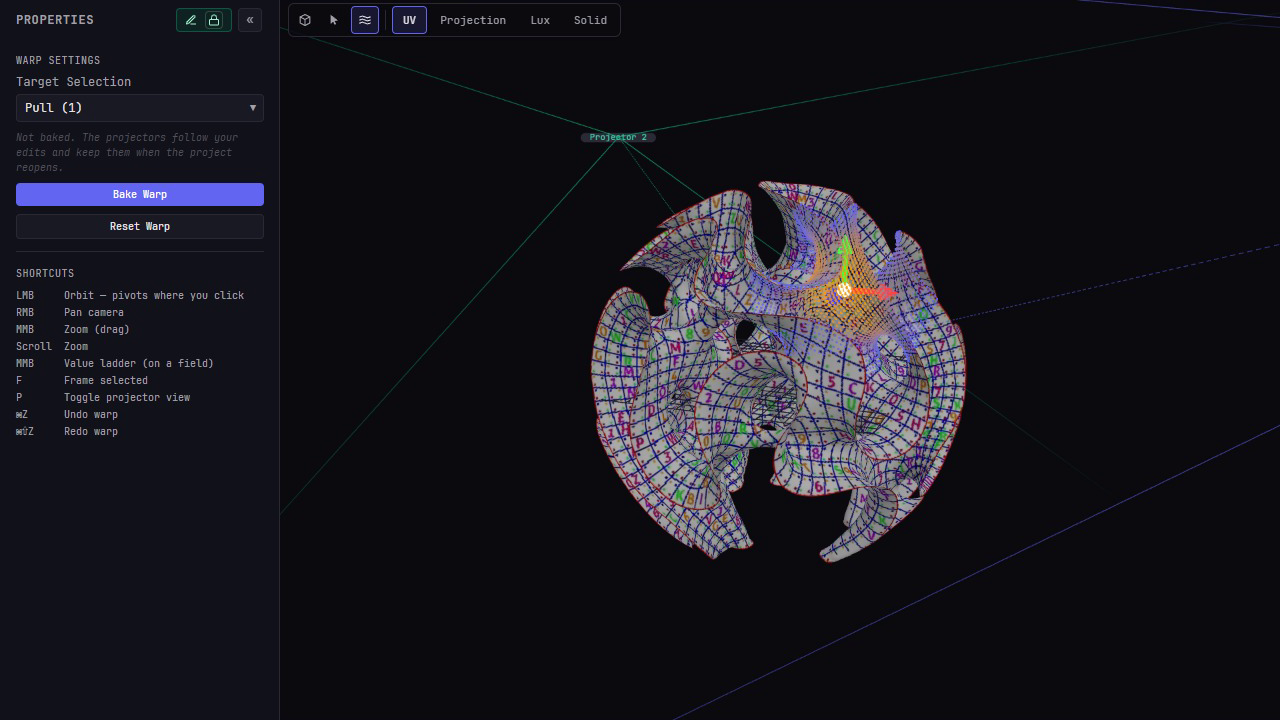
Pull your imported surface model into alignment with the real object. Soft selection moves a controlled neighborhood around each grab; because the surface itself changes, every projector lighting it sees the same correction.
- → Direct vertex manipulation on FBX, OBJ and GLB surfaces
- → Soft selection with a smoothstep falloff — radius and softness
- → Several operators can co-sculpt different regions at once
- → Scoped undo reverses your own vertex edits
- → Bake, reset or revert the shared surface deliberately
From four corners to a curved grid.
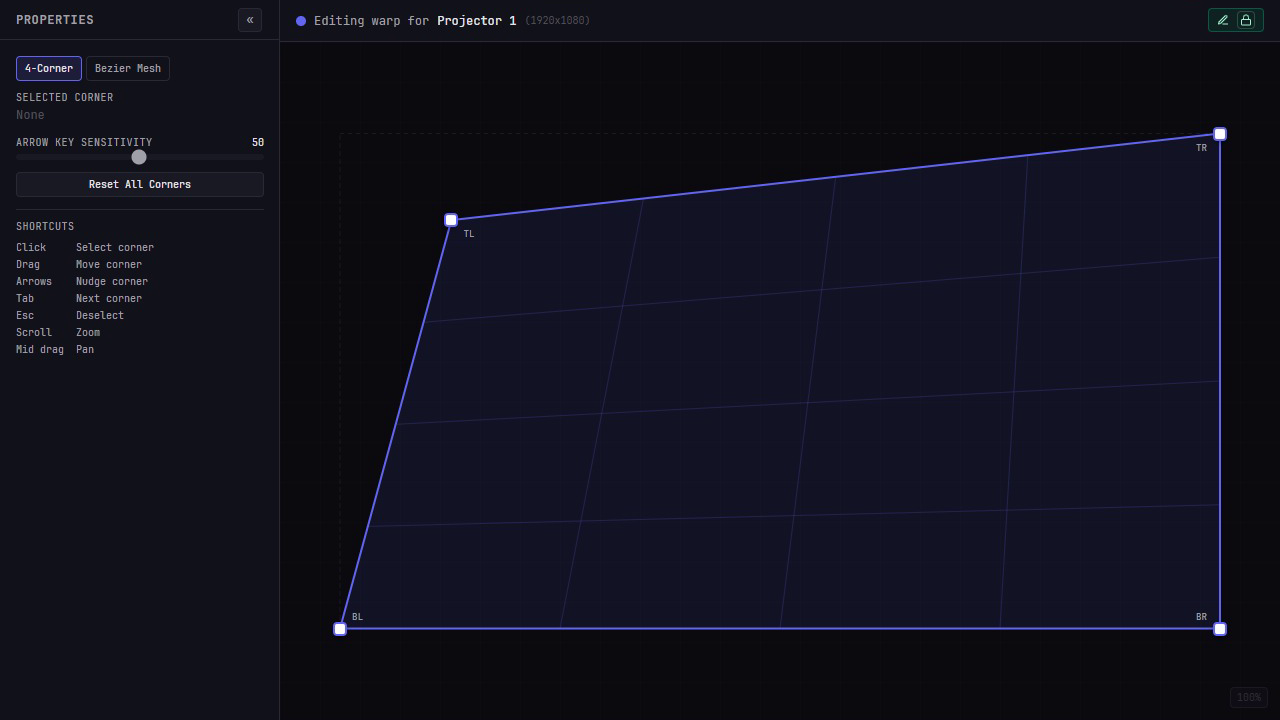
Square up a flat wall with four projector-local corners, then switch to the linked Bezier mesh when the middle needs more control. Both views share the same corner positions, so the first pass carries forward.
- → Four-corner correction with drag and arrow-key nudge
- → Bezier grids from 2 × 2 to 50 × 50
- → Insert rows and columns without jumping the current shape
- → Linked or independent curve handles for smooth bends and creases
- → Per-surface lock keeps warp edits conflict-free
Overlaps that blend themselves.
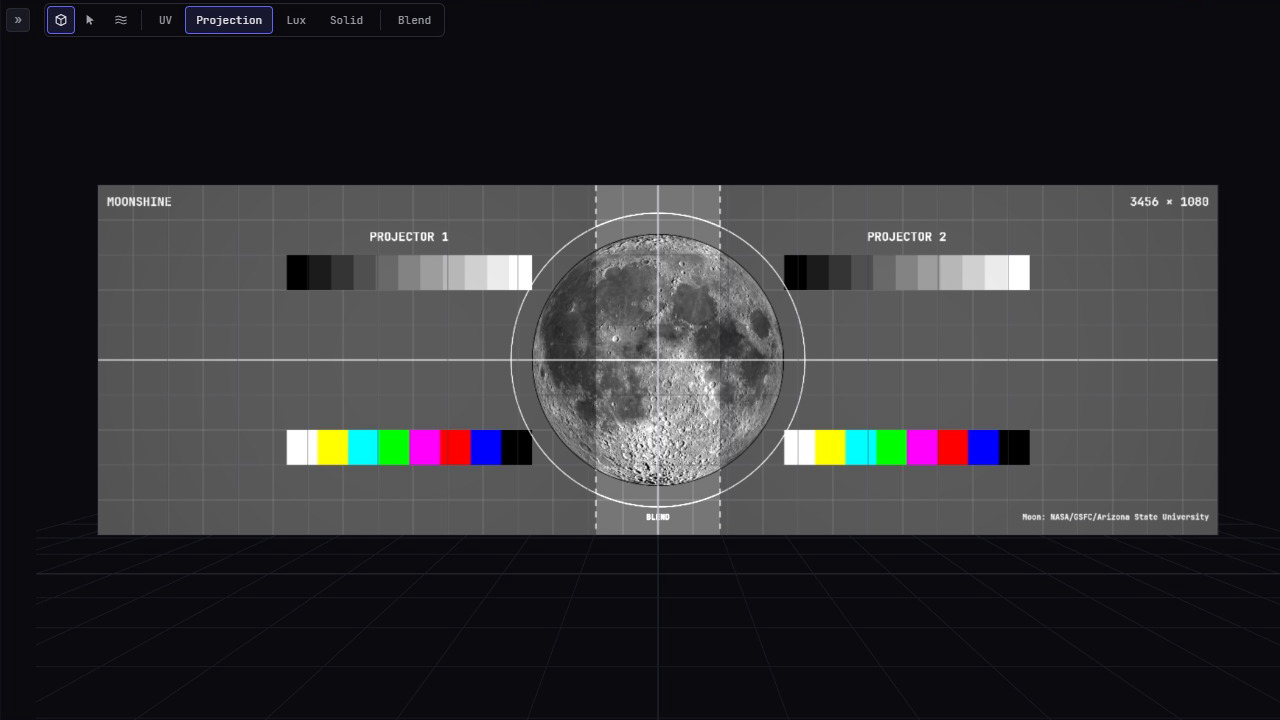
Where two projectors overlap, the surface gets twice the light. Moonblend works out every projector’s fade at once, from where the projectors sit and the surface they light, so each overlap adds up to one projector’s worth. It lands on its own mask layer, beside anything you painted.
- → Calculated from each projector’s pose and lens and the warped surface: nothing to paint
- → Gamma-corrected and dithered, so the fade adds up in light, not pixel values
- → Recalculate in one click; it never touches your painted mask
- → Preview the blended light in the Scene view before it reaches the wall
- → New projects open already blended
Mask with pixels or paths.
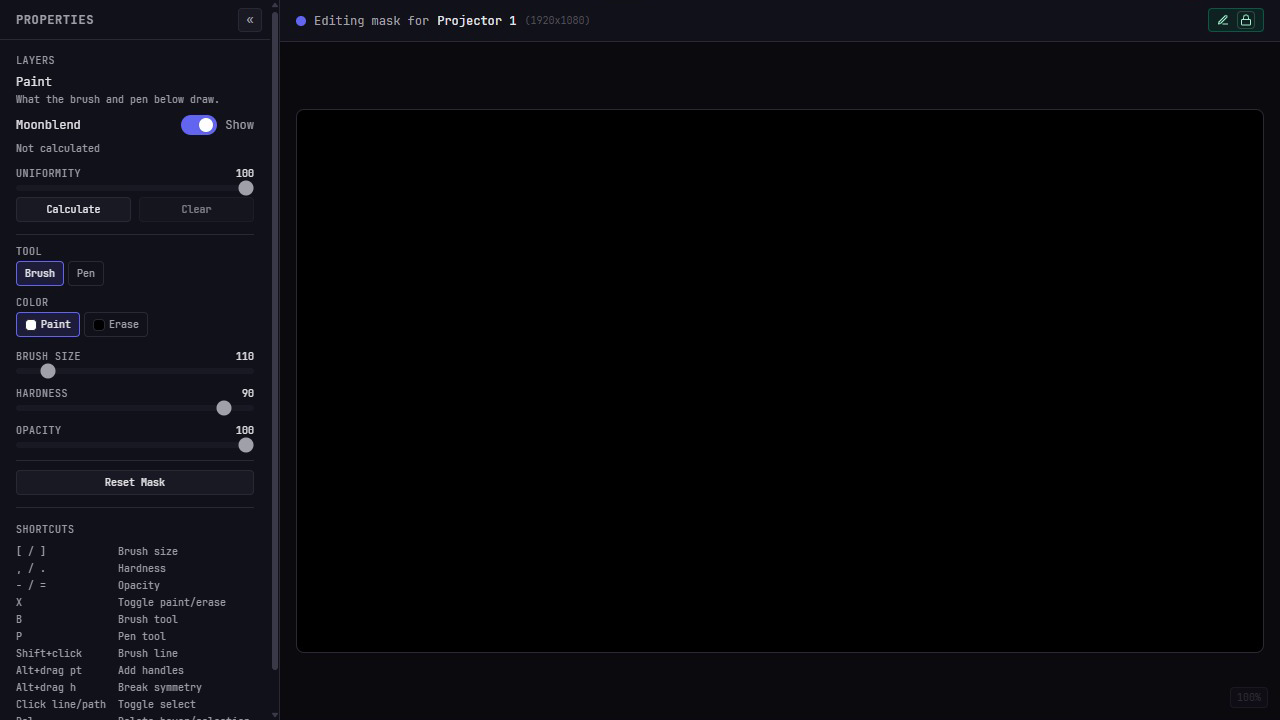
Paint coverage at the projector’s own resolution, or draw editable Bezier paths and use closed shapes as precise brush stencils. Both parts save together as one mask for that projector.
- → Bitmap brush — size, hardness, opacity, paint and erase
- → Editable vector paths with Bezier handles
- → Closed paths constrain painting as reusable stencils
- → One undo history for brush and pen, up to 50 steps
Run cues like a show, not a deck.
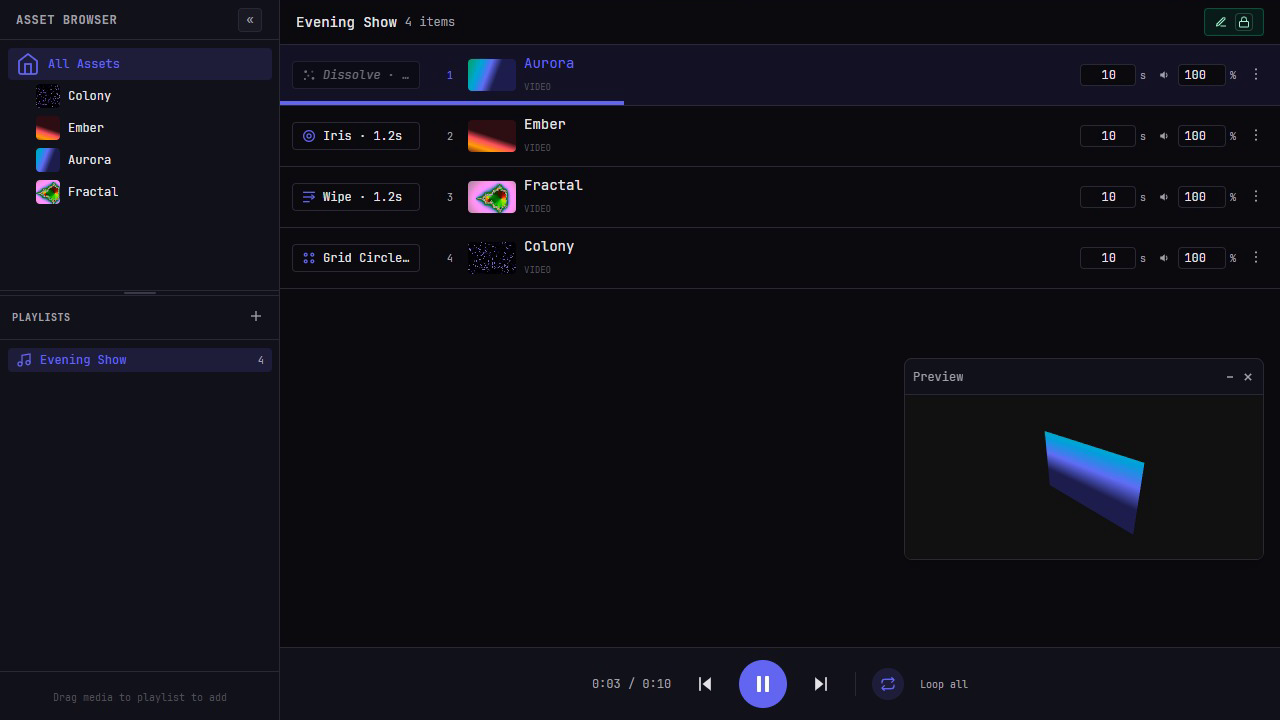
Build ordered cuelists, click any cue to take it live and preview transitions before they reach the wall. Cue timing, loop mode and what is actually playing stay shared across the crew.
- → Drag-orderable cuelists with live progress
- → Each cuelist as a list or as a timeline drawn to scale
- → Eleven transition types, including wipes, irises, grids and movie mattes
- → Built-in and project-shared custom transition presets
- → No loop, loop-all and loop-one playback modes
- → Run from a desk over OSC, MIDI or timecode
Project onto real geometry.
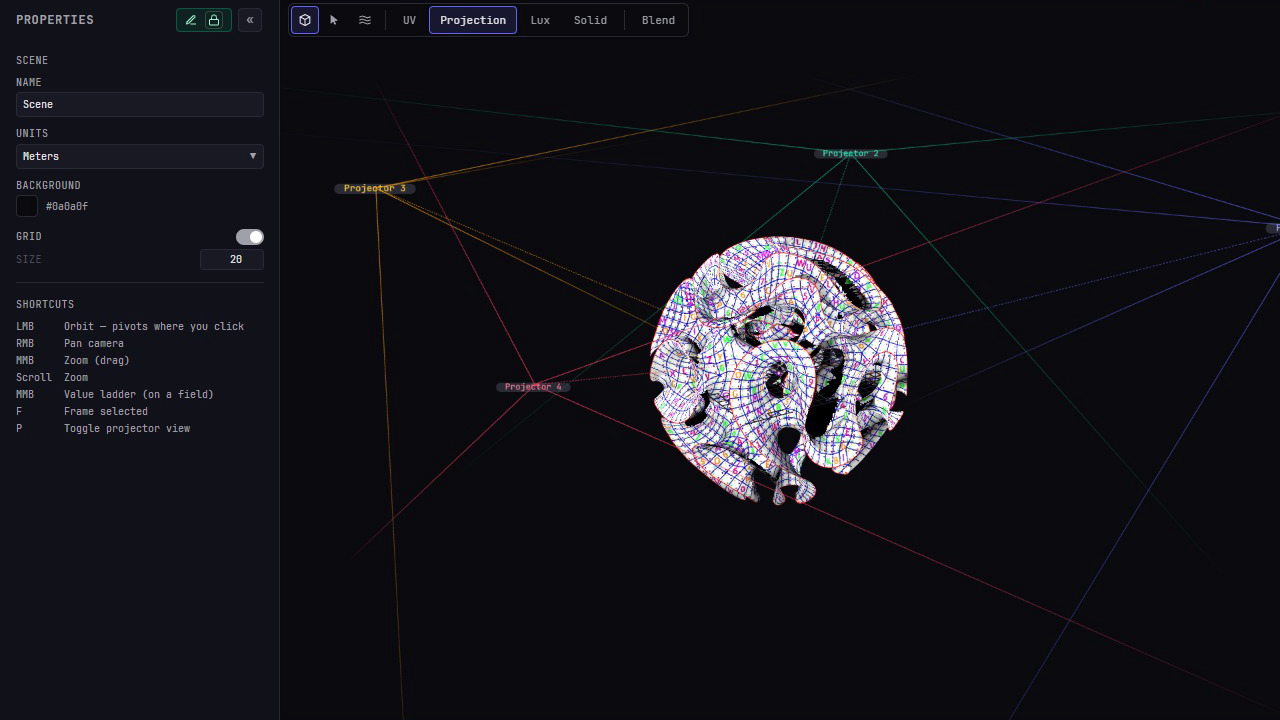
Place surfaces and projectors in a shared Three.js scene, aim through visible throw cones and inspect what the rig is doing before you look at the wall. Imported geometry and built-in primitives live in the same viewport.
- → Drag-drop import: FBX, OBJ and GLB
- → Move, rotate and aim projector bodies in 3D
- → UV, Projection, Lux and Solid display modes
- → Projector-eye view and visible frusta
- → Frame a scene or pivot the camera around a picked detail
Co-sculpt, don’t take turns.
Several operators can pull on different parts of the same 3D surface at once. Per-vertex updates converge on one shared shape, while colored cursors, selections and camera frusta show exactly where each person is working.
- → Lock-free simultaneous editing for 3D surface sculpting
- → Scoped undo takes back only the vertices you moved
- → Live pointers, selection markers and camera frusta
- → Follow another operator’s camera for fast handoffs
- → Coarse locks still guard exclusive edits such as mask and keystone work
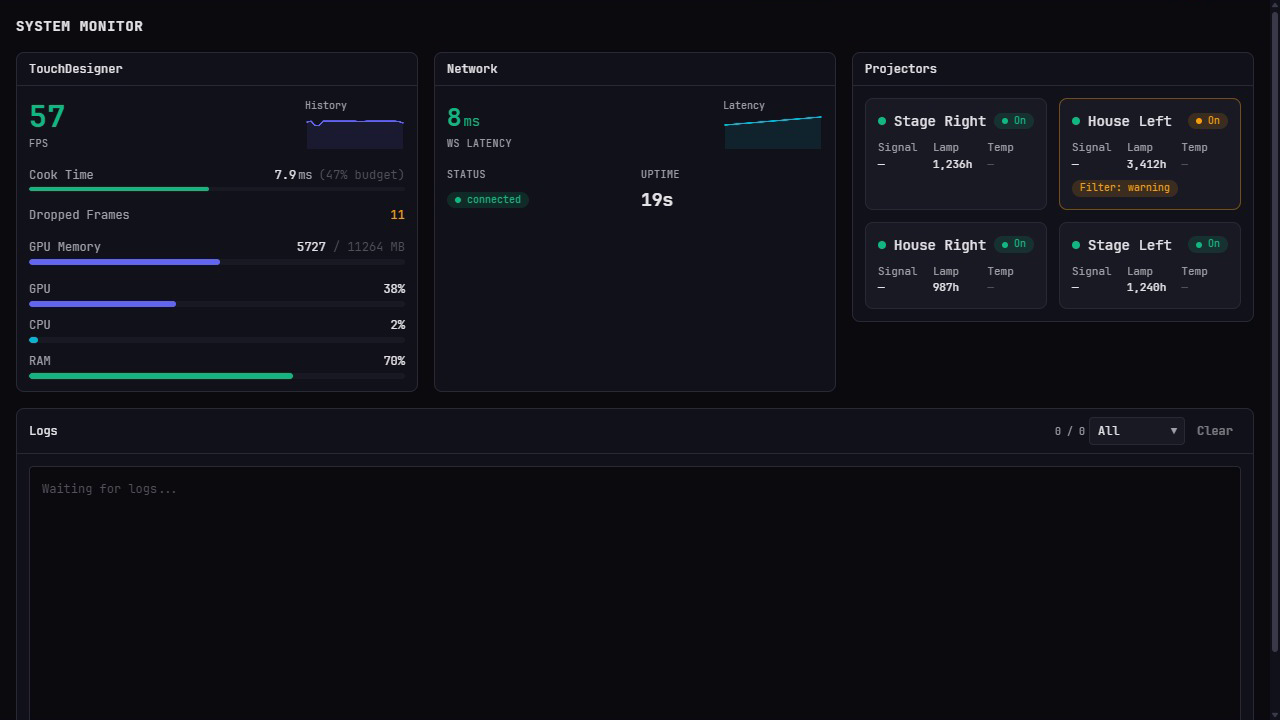
Live vitals, all night long.
Watch frame budget, machine load, network health, projector telemetry and logs without leaving the control surface. Establish a healthy rehearsal baseline, then see when the rig moves away from it.
- → Live engine stats: FPS, cook time, GPU memory and dropped frames
- → PJLink power, lamp hours, reachability and reported faults
- → Every projector on or off at once
- → App WebSocket latency and connection history
- → Full log stream with severity filtering
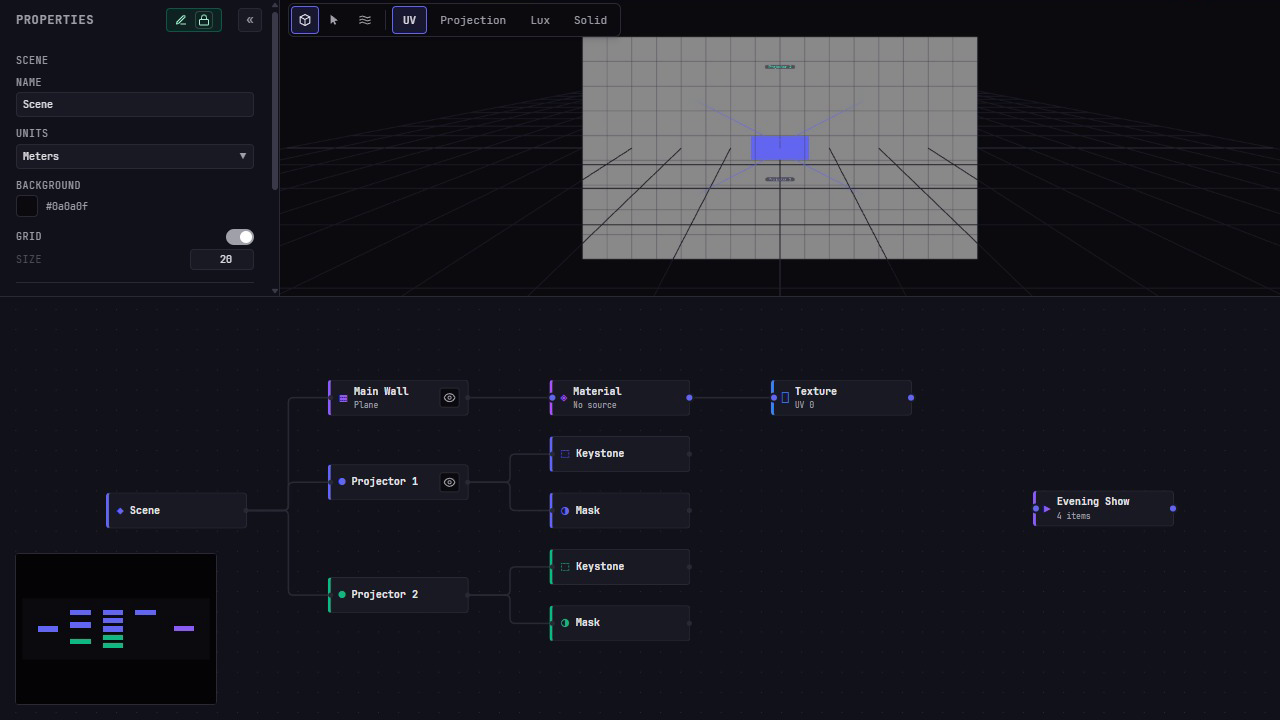
See the show as a live graph.
Surfaces, projectors, alignment tools, masks, media and cuelists stay visible in one graph. Connect media to a surface, select any part of the rig and open its controls without hunting through hidden routing state.
- → Scene tree for surfaces, projectors, warps and masks
- → Loose media and cuelist nodes where routing work happens
- → Drag-connect cuelist → surface assignments
- → Context actions for creating, renaming, resetting and removing
Live preview, on everyone’s screen.
Moonbeam captures TouchDesigner’s preview, the canvas at its own size up to 4K, encodes it once as H.265/HEVC in hardware (NVENC on Windows, VideoToolbox on a Mac), and fans the same stream out over a dedicated WebSocket. Each client decodes with WebCodecs, without adding another encoder per operator.
- preview lag
- 9–12 ms p95
- frame cost, GPU to spare
- none
- frame cost, GPU maxed out
- ≈ 0.5 ms
Measured October 4, 2026 on Windows with an RTX 4070 Ti SUPER at 3456 × 1080 / 60 fps, one viewer. Network, GPU and content affect real-world results.
TouchDesigner
Preview up to 4K
Authoritative render
Moonbeam
1× hardware encode
HEVC over WebSocket
Operators
WebCodecs decode
Same frames, fanned out
One app. Both platforms.
Run the same Moonshine interface in its own window. The app finds the show machine on the local network and shows the hardware-decoded preview without the browser certificate setup. Prefer a browser? Share Moonshine by QR code and complete the one-time trust step for live video on that device.
Your team runs the show. TouchDesigner renders it.
The operator UI sends compact control state to TouchDesigner. Moonbeam carries the live H.265 preview separately, so video never competes with show commands in the same protocol.
Operator clients
- Desktop app for Windows and Mac
- Trusted browser on the LAN
- One shared project state
TouchDesigner
- Renders and plays the show
- Holds authoritative state
- Control WS + Moonbeam WS
Mapped outputs
- Per-projector keystone + mask
- Shared 3D surface alignment
- Cued, transitioned, live
What sets Moonshine apart.
Surface-first alignment
Sculpt imported 3D geometry once and every projector aimed at that surface inherits the same correction.
Collaboration in the model
Presence, locks and per-vertex co-sculpting are part of the shared state model, not a file handoff layered on later.
TouchDesigner underneath
Keep TouchDesigner as the renderer and show engine while giving operators a focused interface for daily mapping work.
One preview encode
Moonbeam encodes the live composite once on the show machine’s GPU and fans the same HEVC frames out to every capable client.
The 3D alignment difference
Projector-local keystone and Bezier correction solve output-space problems. Moonshine’s 3D workflow solves a different one: when the digital model does not match the object in the room, pull the shared surface into place with soft selection, then bake that shape for the rig.
How it compares
- yes
- partly
- no
- ≈approx.
| Moonshine beta | Resolume Arena 7.28 | MadMapper 6.1 | Millumin 5.14 | HeavyM 2.15 | Isadora 4.5 | WATCHOUT 7.8 | PIXERA 26.1 | disguise r34.1 | Avolites Ai 12.3 | |
|---|---|---|---|---|---|---|---|---|---|---|
| Cost and scale | ||||||||||
| Price | $399 + $300 once; the $300 is a TouchPlayer licence | ≈ $910 €799 once, 1 year of updates | ≈ $545 once for 2 seats, or ≈ $50 a month | $499 once, or ≈ $79 a month | $449 once for Pro; Live is $229 | $725 once, or $199 a year | ≈ $2k per server; estimate from v6 licences | ≈ $10k 4 outputs; estimate from a used listing | ≈ $25k+ used servers, up to $125k; X1 software ≈ $6k a year | ≈ $1.2k+ 2-output licence; servers ≈ $23k–97k |
| Runs on | Win, Mac | Win, Mac | Win, Mac | Mac only | Win, Mac | Win, Mac | Win only | Win only | Win only shows need its servers or an X licence | Win only |
| Outputs per machine | GPU-limited | GPU-limited | GPU-limited | GPU-limited | GPU-limited Pro and up; Live has 1 | Up to 16 displays | 8 × 4K per licence | 1–8 per licence | 1–4 × 4K per server | 2–8 by licence tier |
| Several machines, one show | Yes one leads, the rest follow | Partly timecode or OSC | Partly timecode or OSC | Partly timecode, or MilluNode in beta | Partly over OSC | Partly timecode or OSC | Yes | Yes | Yes | Yes |
| Mapping | ||||||||||
| 3D mapping onto models | Yes OBJ, FBX, GLB; projectors light one surface | No 2D slices and warps | Partly OBJ, calibrated one surface at a time | Partly OBJ or DAE, from one viewpoint | No 2D shapes | No 2D mapping | Yes | Yes | Yes | Yes |
| 3D mesh warping | Yes soft selection; every projector shares it | No 2D warping only | No fits a model, cannot reshape it | No fits a model, cannot reshape it | No 2D warping only | No 2D warping only | No fits projectors to the model only | Yes deformer and vertex edits | Yes fitted to an OmniCal camera scan | Partly vertex edits per projector |
| Edge blending | Automatic from the 3D scene; no hand tuning | Manual | Manual auto setup on quads | Manual | Manual Pro and up | Manual overlap measured for you | Automatic flat displays only; masks on 3D | Both manual or calculated | Both manual or calculated | Both manual, or AutoBlend by camera |
| Auto-calibration | Planned PROOF, in development | Add-on VIOSO, third-party | Partly scanner gives a tracing guide | No | No | No | Add-on third-party, imported as MPCDI | Add-on paid VIOSO licence | Yes needs disguise camera kits | Yes Bondi and Miami licences |
| Teamwork | ||||||||||
| Multi-user editing | Yes any browser or the app; no licence per operator | No | No | No | No | No | Partly a shared media library only | Yes each editor runs PIXERA on Windows | Yes each editor needs Designer Pro | No |
| Browser access | Yes full editing on any device | Partly clips, not mapping | No | No | No | No | Partly playback control, media upload | Partly control panels you build | Partly control panels and APIs | No |
| Show control | ||||||||||
| Timeline and timecode | Yes LTC; a timeline per cuelist | Partly LTC; a clip grid, no timeline | Yes LTC, MTC | Yes LTC, MTC | Partly a timeline, no timecode | Partly MTC; scenes, no timeline | Yes LTC | Yes LTC, MTC | Yes LTC, MTC | Yes LTC, MTC |
| DMX, OSC, MIDI | Partly OSC and MIDI; no DMX | Yes Art-Net, OSC, MIDI | Yes Art-Net, sACN, OSC, MIDI | Yes Art-Net, sACN, OSC, MIDI | Yes Art-Net in, OSC, MIDI | Yes Art-Net, OSC, MIDI | Yes Art-Net, OSC, MIDI | Yes Art-Net, sACN, OSC, MIDI | Yes Art-Net, sACN, OSC, MIDI | Yes Art-Net, sACN, MIDI |
| Live effects | Yes TouchDesigner .tox files | Yes 100+ effects, reacts to audio | Yes shaders, reacts to audio | Yes shaders and effects | Yes 200+ shaders, reacts to audio | Yes nodes, shaders, audio | Partly built-in effects only | Yes shaders, Notch, Unreal | Yes Notch, Unreal, TD | Yes nodes, shaders, Notch |
| Failover | Yes with Transmission | No licence covers a spare machine | No licence covers a spare machine | No do-it-yourself scripts | No Pro+ covers a spare machine | No | No none documented | Yes automatic or manual | Yes understudies take over | No none documented |
Sources and notes
Checked against each vendor’s own site and manual on 24 September 2026. Each column is the product’s current release on that date. Prices are list prices before tax, in US dollars; euro prices are converted at that day’s rate, €1 = $1.14, and marked ≈. Four vendors quote privately; for those, ≈ marks our estimate from reseller, press and second-hand listings. “Partly” means the feature exists with the limit noted under it: pick fewer products to see the notes. Product names are trademarks of their owners. Something out of date? Tell us at support@tridant.io.
- Moonshine: pricing · TouchPlayer
- Resolume: shop · Avenue vs Arena · multiple outputs · VIOSO
- MadMapper: pricing · 3D and scanning · 3D calibration · soft edge
- Millumin: pricing · 3D structure · MilluNode
- HeavyM: pricing · multiple projectors
- Isadora: pricing · blending · show control
- WATCHOUT: licences · v6 licence resale · edge blending · Asset Manager
- PIXERA: licences · used licence listing · edit mesh · multi-user · backup
- disguise: pricing · used servers · X1 price · mesh deform · MultiEdit · OmniCal
- Avolites Ai: licences · reseller prices · features
PROOF is in development.
PROOF will measure where each projector sits and how its lens throws, with a phone camera and structured light against the scene you built, and fill those settings in for you. It is not part of the current release; what ships today is the alignment shown above, with Moonblend calculating blends from the scene rather than a camera.
Talk to us about PROOF
Touring, install, one-off.
Same control surface.
Touring shows
Crews moving city to city need fast setup, shareable state, and a control surface a second op can pick up cold.
Fixed installs
Long-running rigs need observability, predictable saves, and a focused control surface that keeps operators out of the TouchDesigner network.
Live events
One-night shows demand muscle-memory cues, soft-launch transitions, and zero-surprise playback under pressure.
One license. No subscription.
founders
One year of updates included.
For the first 200 licenses, while Moonshine is in beta.
Get a founders licensestandard
One year of updates included.
After the founders licenses are gone.
Want updates after the first year?
Renew for another year: $99 for founders, $149 for standard. It's optional: Moonshine keeps working on the last version your updates covered.
Each license runs Moonshine on up to two show machines.
A primary and a backup, or production and development. On each machine:
- Up to 4 outputs from an NVIDIA GPU, or 3 from a Mac mini with M4.
- Coming after launch: up to 8 4K outputs with Transmission and a Blackmagic 100G card.
- Unlimited NDI outputs, as many as the machine and network can carry.
- Operators join from the desktop app or any browser, with no license per operator.
macOS · Windows. Moonshine also needs a TouchDesigner license suited to your show. Every purchase has a 14-day money-back guarantee.
Common questions.
Does it require TouchDesigner?
Yes. The Moonshine server is a TouchDesigner project: TouchDesigner renders, plays media and drives the outputs while Moonshine provides the operator interface. Use a TouchDesigner license appropriate to your show.
What runs where?
The show machine runs Windows with an NVIDIA GPU, or macOS on Apple silicon -- the live preview every device sees is encoded in hardware there, by NVENC or VideoToolbox. The desktop app runs on Windows and Mac. Other devices on the same LAN can join through a supported browser. Browser controls are broadly available. Live preview is HEVC only and needs hardware decode, WebCodecs and a trusted secure connection -- there is no H.264 fallback, so a device without HEVC decode gets the controls but not the picture.
How many users can join a session?
Moonbeam uses one encode and fans it out, so there is no per-viewer encoder pool or stream-slot cap. Practical session size still depends on the show machine, network and how many operators the workflow can usefully support — rehearse the crew and rig you plan to run.
What are the network requirements?
Moonshine is designed for a local network. Use wired Ethernet for the show host and show-critical operator stations; Wi-Fi is useful for setup and mobile adjustments. Browser video uses a secure LAN address and a one-time certificate trust step, while the desktop app handles that path without browser setup.
How does live preview work?
Moonbeam captures TouchDesigner’s preview, the canvas at its own size up to 4K, performs one hardware H.265/HEVC encode (NVENC on Windows, VideoToolbox on a Mac), and sends the same frames over a dedicated WebSocket. The client decodes them with WebCodecs.
How do I get the show server?
Download it from download.moonshine.software, for Windows or Mac. It runs once it has a license key: see pricing above.
What is PROOF?
PROOF is camera-assisted calibration, in development: it will measure each projector’s position and lens with a phone camera instead of you setting them up by hand. It is not part of the current Moonshine release. Blending is: Moonblend calculates it from the scene you build.
Can I use it for touring shows, fixed installs, or live events?
Yes — all three. Moonshine doesn’t care about venue type; it cares about whether your team needs to run a projection rig together.
Get help.
License and seats
See your licenses, release a seat or move Moonshine to another machine yourself.
id.tridant.io →Email support
Include your Moonshine version, your OS, whether it happened on the server or a client, and what you saw.
support@tridant.io →Get Moonshine.
Install the server on the machine wired to your projectors, then open the app, or any browser, on the same network. For Windows, and for macOS on Apple silicon.